

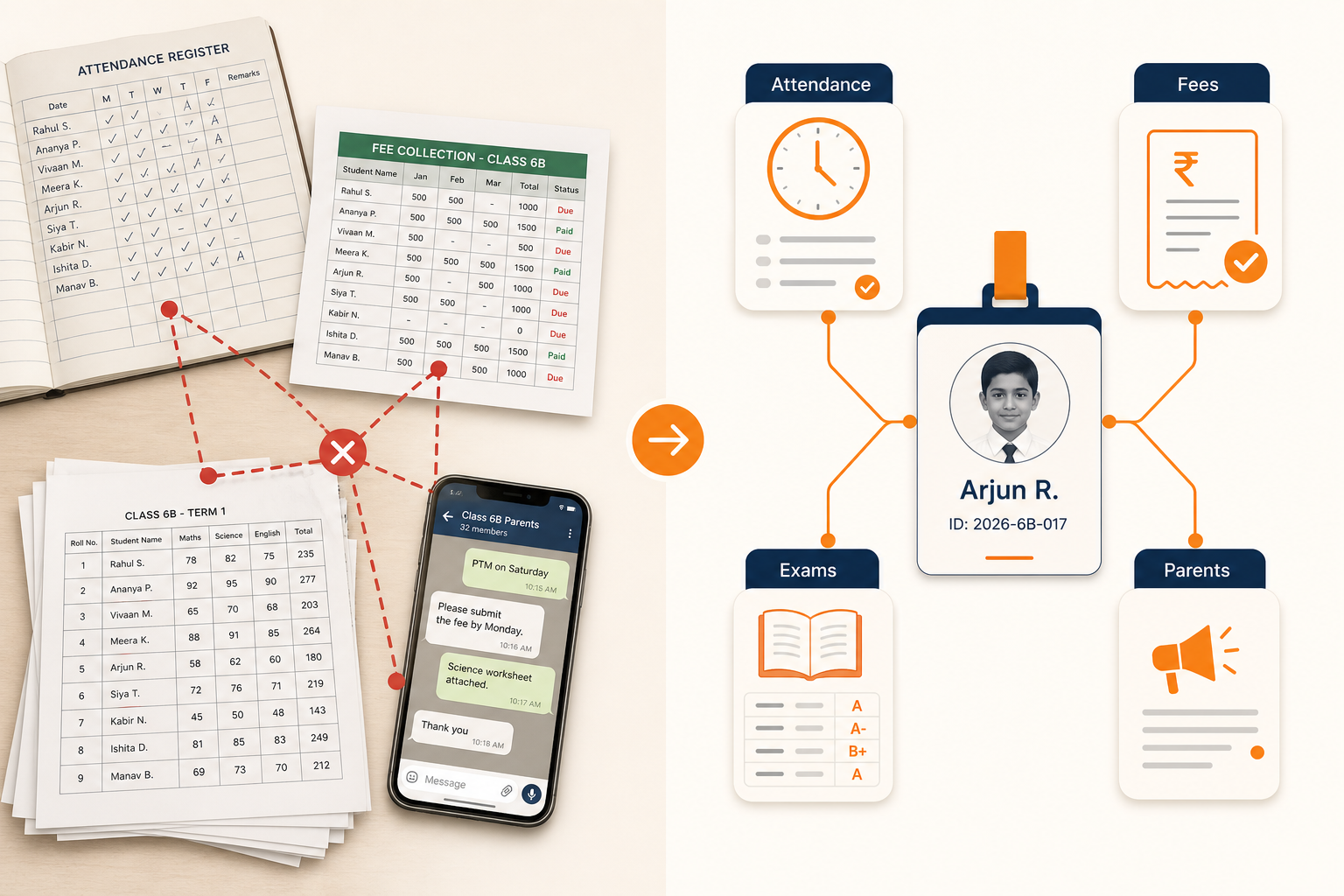
A school with 800 students may have attendance in one system, fees in Excel, examinations in another application, and parent communication happening through WhatsApp. The result is duplicated work and inconsistent data. Staff spend the day reconciling records instead of running the school.
This guide explains what school management software actually does, where it differs from a simple spreadsheet or a single-purpose app, and what to look for before you buy. It is written from our work designing Orbit, our school management software — not from a glossary.
The problem is not “lack of software”
Most schools already use software. They have a fee collection screen, a biometric device, a WhatsApp broadcast list, and a shared drive of marksheets. The problem is that none of those tools share a student record. When a parent asks “has the fee been paid and was my child present today?”, three people have to look in three places.
School management software exists to make the student the centre of the record: class, attendance, fees, exams, transport, and communication all point at the same person.
What the software is supposed to cover
A useful platform is not a single module with a marketing name. It is the daily operating system of the school. In practice that means:
- Student and class records that teachers and office staff both trust
- Attendance that can be marked and shared with parents the same day
- Fee structures, receipts, dues, and reminders without a parallel spreadsheet
- Exams, marks entry, and result publishing from the same student record
- Timetable, assignments, and daily diary for academic communication
- Transport, library, inventory, and staff payroll when the school has grown past paper registers
If a new student is admitted and you still have to create them separately in fees, transport, and the parent app, you do not have a school system. You have a collection of tools.
School management software vs a student information system vs school ERP
These labels are used interchangeably in sales decks. They are not the same job.
What each label usually means in a school
| Label | Typical scope | Where it breaks |
|---|---|---|
| Attendance / fee app | One operational task | Everything else still lives in Excel and WhatsApp |
| Student information system | Enrolment, classes, marks, basic reports | Finance, transport, and parent communication stay disconnected |
| School management software | Academics plus office operations | Weak if payroll, inventory, and multi-campus reporting are missing |
| School ERP | Academics, finance, staff, operations, communication in one record | Fails if it is too heavy to adopt or if modules do not share data |
We wrote a fuller comparison in School ERP vs school management software. The short version: buy the scope you will actually operate, not the label.
A concrete example
Consider a school with 1,000 students. If attendance is recorded on paper every morning, each teacher spends several minutes marking and later copying names into a register or spreadsheet. The office then answers parent calls about absences that were never sent. None of that time appears as a budget line. It just consumes the day.
When attendance, diary, and parent alerts share one student record, the office is not the bottleneck for a question the teacher already answered at 8:15am. That is the job of school management software — not a dashboard nobody opens.
What we learned while designing Orbit
While designing Orbit, we found that schools do not fail digital projects because they lack features. They fail because admissions, fees, and communication were treated as separate products. A parent portal that cannot show fee status next to attendance is another login, not a solution.
The other pattern: if teachers cannot mark attendance and publish a diary from a phone, the “system” stays in the office and paper returns to the classroom.
Evaluation checklist
School management software — 12 questions before you buy
- Is there one student record for academics, fees, and communication?
- Can teachers mark attendance without a desktop in the staff room?
- Can parents see attendance, fees, and results without calling the office?
- Are fee structures, discounts, and dues handled without a side spreadsheet?
- Can exam marks be entered once and published to the right portals?
- Does the timetable live in the same system as classes and teachers?
- Is role-based access real (office staff should not see every HR field)?
- Can you export or back up records you would need in an inspection?
- Does transport, library, or inventory share the same student identity if you need those modules?
- Can more than one campus report without merging Excel files?
- Who trains teachers in the first 30 days — and is that included?
- What happens to historical marks and fee receipts if you leave later?
Common mistakes
- Buying an attendance device and calling the school “digital”
- Keeping fees in Excel “just for this year” after going live
- Giving every staff member admin access because setup felt urgent
- Choosing software from a demo of reports instead of a demo of a normal Tuesday
What to do next
Map one student journey: admission → class allocation → first attendance → first fee receipt → first exam result → first parent message. If that journey still crosses four tools, you do not have school management software yet. You have software adjacent to the school.
If you are comparing platforms, use How to choose the best school management software. If the school still runs on spreadsheets, start with How a school can move from Excel to a complete school ERP.
FAQ
Is school management software only for large schools?
No. Smaller schools often feel the pain first because one person is doing admissions, fees, and parent calls. The question is whether the platform can start simple and still hold a single student record as you add modules.
Can we keep Excel for fees and use software only for attendance?
You can, but you recreate the original problem: two sources of truth. Parents and inspectors will still get conflicting answers. If fees stay in Excel, treat that as a temporary migration step, not the design.
Do parents need a separate app?
Parents need a secure way to see attendance, fees, and results. Whether that is a mobile app or a portal matters less than whether it reads the same record the office uses.
Looking for a platform that keeps academics, fees, and parent communication on one student record? Orbit ERP is Devzin’s school and college ERP — available for schools to review in a demo.